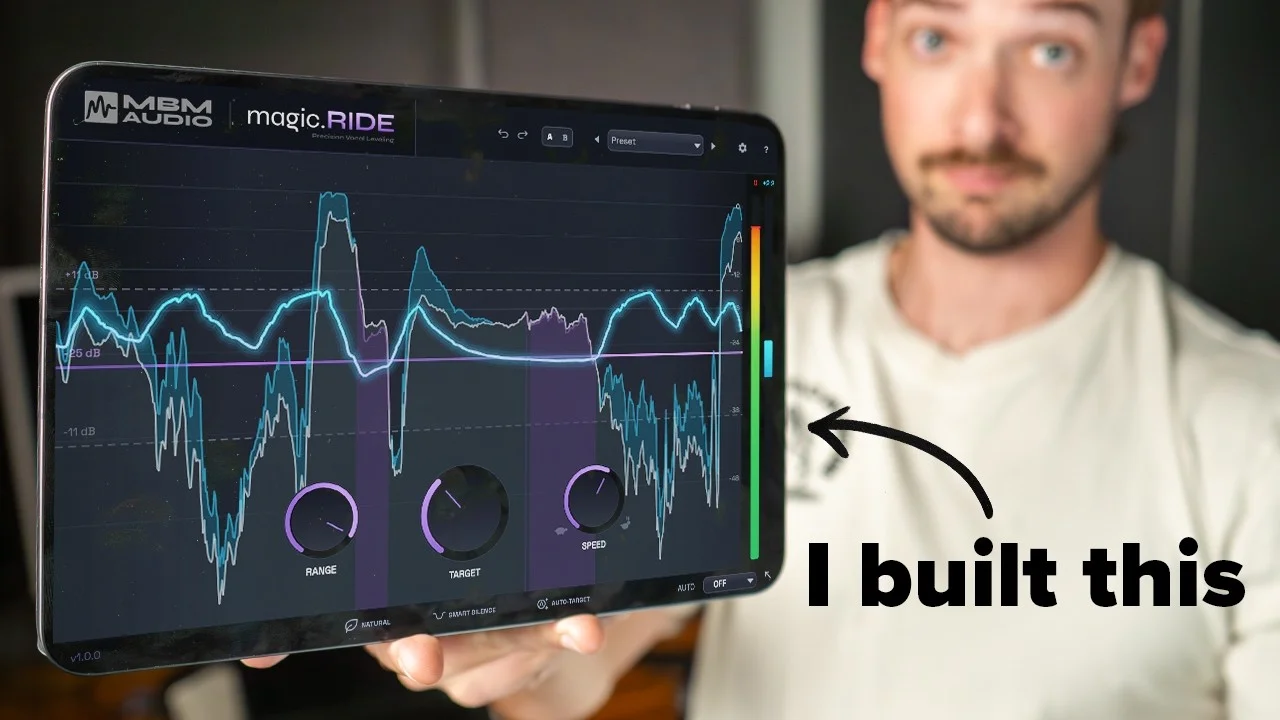
I got tired of spending hours automating vocals, so I built an entire plugin
I spent years manually automating vocal levels, so I built magic.RIDE — a vocal dynamics plugin that handles it automatically. Here's the story.

Key Takeaways
- Existing vocal automation plugins sound robotic because they analyze peaks instead of musical phrases.
- Heavy compression kills vocal energy, so proper gain staging before compression is essential.
- Building audio plugins requires understanding phrase structure rather than treating each syllable separately.
- Magic.RIDE's Natural mode recognizes complete vocal phrases to create human-sounding automation.
- You can save hours by letting the plugin write automation in real-time instead of drawing curves manually.
You see that little dot in your DAW’s automation lane? I hate that dot.
It represents vocal automation — the tedious process of manually drawing hundreds of gain points to make every syllable sit perfectly in your mix. It’s essential for modern, upfront vocals, but getting it right means spending hours drawing these things manually.
I got sick of it. So instead of continuing to waste time on this mind-numbing task, I decided to build an entire plugin to do it for me.
It worked out so much better than I thought it could.
I also made a full video on this…
All the ideas in this article come from the video below. If you don't feel like reading, well, I gotchu.
Part of the Vocal Presets & Processing series — For the full picture, read my guide to finding and making vocal presets.
The Problem with Existing Solutions
Before you start typing “Mattie, why don’t you just use the plugins that already exist?” — trust me, I’ve tried.
I know what you’re thinking. There are vocal rider plugins out there. Why not use compression? Fair questions, but let me explain why these solutions fall short.
I’ve tested almost every vocal automation plugin on the market, and they all have the same fundamental problem: they don’t work that well.
Almost every time I use them, I get weird volume jumps between phrases that sound robotic and unnatural. The result? I end up going back and manually adjusting them anyway. If I’m going to do that, why not just do it manually in the first place?
Take Waves Vocal Rider, for example. This plugin looks like it’s straight out of 2005 (which some of you probably weren’t even born then). But the outdated interface isn’t even the main issue.
Why Current Plugins Sound Robotic
The core problem with most auto-mixing plugins is that they don’t hear music the way humans do.
Most vocal riders just analyze audio peaks — pure math. But humans don’t hear peaks. We hear loudness.
Here’s what happens when you feed the word “subscribe” into a typical vocal rider:
The computer sees it as three distinct parts:
- The “sub”
- The “scry”
- The “be”
When it adjusts levels, it analyzes how loud or soft each waveform section is and adjusts automatically. It might boost the first part, come down on the second, then when it hits that sharp transient in “be,” it freaks out and creates volume changes across the entire phrase.
The result? A lot of volume changes that sound weird and robotic.
Real mixing engineers and humans intuitively understand that “subscribe” is one complete phrase. They know that transient doesn’t need to be treated like a separate element. This disconnect is exactly why I struggle with plugins like Vocal Rider — they end up sounding jittery and nervous.
Why “Just Add More Compression” Doesn’t Work
The other solution people suggest is adding more compression. That works, but only to a point.
The more compression you add to a vocal, the more life and energy you suck away.
If you want that expensive, professional sound, it’s almost essential to gain stage before going into a compressor. The more consistent the vocal is before compression, the better results you’ll get.
So no, I’m not crazy for wanting this. I just wanted a tool that didn’t exist yet.
Building Magic.RIDE from Scratch
I needed something that understood gain staging better than existing options. Something that could visually show me what it was doing more clearly than Waves Vocal Rider.
So I decided to build it myself.
The first 50 iterations of this plugin were absolutely terrible. Bad-smelling garbage. Some worked okay but looked terrible. Others looked great but had zero functionality — and pretty much every flavor of disaster in between.
Now, I should mention: I am not a C++ developer. I’m a music producer. I know JavaScript well enough to have a side hustle building websites, but I know nothing about audio programming.
I quickly discovered that coding a website is vastly different from coding a full-fledged audio plugin. So I turned to AI to help me learn.
Learning Audio Programming with AI
I like to think I hired an AI as my development intern — one that somehow knows five times more than I do about audio processing.
But like most interns, the first iterations I got from the AI were bad. Really bad.
Even though those early versions weren’t great, I kept pushing forward. Every day brought more progress. I learned about audio processing concepts I’d never heard of before:
- Anti-aliasing
- Interpolation
- Advanced metering techniques
I had no idea what I was doing when I started. But after a month of perseverance, chatting with an AI bot like it’s my therapist, and learning the archaic language of C++, I created something that actually sounds good.
Introducing Magic.RIDE
After all those iterations, here’s what I built: Magic.RIDE.
The plugin starts working immediately when you load it. You can see exactly what it’s doing in real-time:
- Anything above the purple target line is adding gain
- Anything below is reducing gain
- You can adjust the target line by simply dragging it
- The range knob controls how much gain change is applied (shown with the dash lines)
- The speed knob adjusts how quickly it responds
What Makes Magic.RIDE Different
Here’s where Magic.RIDE separates itself from everything else on the market: you have way more control.
Advanced Panel Controls
When you open the advanced panel, you get access to:
- Attack and Release controls — fine-tune the response timing
- Hold parameter — control how long adjustments stay in place
- Breath reduction — automatically handle breathing between phrases
- Transient detection mode — preserve natural-sounding transients
- Algorithm selection — choose between RMS or LUFS metering
- Look-ahead processing — even higher fidelity vocal riding
If those technical terms don’t mean anything to you, don’t worry. There’s something even more important.
The Natural Button
This button is what makes Magic.RIDE truly different. When Natural mode is active (indicated by the green light), the plugin actually auto-recognizes phrases in a vocal and creates more human-like rides.
Instead of treating every syllable as a separate element, it understands natural speech patterns and phrase structures. This gives you a much smoother vocal ride that sounds human rather than robotic.
Hearing Magic.RIDE in Action
To really push this plugin to its limits, I recorded a deliberately inconsistent vocal — the kind that would normally require extensive manual automation.
Without Magic.RIDE: The vocal jumps all over the place dynamically. Some words disappear in the mix while others jump out aggressively.
With Magic.RIDE: The vocal sits consistently in the mix. Every word is clear and present without any robotic artifacts.
And all I had to do was click a button. No manual automation. No drawing hundreds of dots.
Automation Writing Mode
If you want even more control (like Waves Vocal Rider offers), Magic.RIDE can write automation for you in real-time.
Turn on automation latch mode, and the plugin literally writes the automation as it works. My hands aren’t even touching the keyboard — the plugin does all the work, and I can fine-tune it later if needed.
This plugin is going to save me a ton of time. It already sounds better than anything I’ve tried, and we barely dialed in any settings.
The Technical Foundation
Building Magic.RIDE taught me that effective vocal automation requires understanding both the technical and musical sides of the equation.
The plugin uses sophisticated algorithms to:
- Analyze phrase structure rather than just individual peaks
- Preserve transient characteristics that give vocals their natural feel
- Apply gain changes smoothly across musical phrases
- Maintain the vocal’s original character while improving consistency
Why This Approach Works Better
Traditional vocal riders fail because they’re built on outdated assumptions about how audio should be processed. They treat vocals like static waveforms instead of dynamic musical performances.
Magic.RIDE recognizes that vocals are:
- Phrase-based rather than syllable-based
- Contextual — the same peak level might need different treatment in different musical contexts
- Dynamic — natural variations are part of what makes vocals sound human
Beyond Automation: A Complete Vocal Solution
Magic.RIDE isn’t just about replacing manual automation. It’s about rethinking how we approach vocal consistency in modern production.
The plugin handles the tedious technical work so you can focus on the creative decisions. Instead of spending hours drawing automation curves, you can:
- Focus on performance and arrangement
- Make creative EQ and effects decisions
- Dial in the perfect compressor settings on an already-consistent vocal
- Actually enjoy the mixing process
Getting Your Hands on Magic.RIDE
The full plugin launches February 10th, but you don’t have to wait that long.
Join the waitlist and you’ll get:
- Early access before the official launch
- 50% off the launch price
- First look at tutorials and documentation
I’m incredibly excited for you to start using Magic.RIDE in your mixes. After months of development and testing, I genuinely believe this plugin solves a problem that’s been frustrating producers for years.
It’s the magic ride — without the carpet. (Still workshopping slogans, but you get the idea.)
Finally, no more drawing hundreds of automation dots. No more robotic-sounding vocal riders. No more compromising between consistency and character.
Just professional, musical vocal automation that actually sounds like a human mixed it.
Want a professional starting point? My Vocal Magic presets give you ready-made vocal chains for any genre — EQ, compression, reverb, and more, all dialed in and ready to go.
Or grab my free vocal presets to try before you buy.
About Mattie
Mattie is a music producer, songwriter, and educator specializing in Logic Pro and vocal production. With over 10 years of experience in the music industry, he's helped thousands of artists transform their home studio recordings into professional-quality tracks.
As the founder of Music By Mattie, he creates tutorials, presets, and courses that simplify complex production techniques. His mission is to make professional music production accessible to everyone, regardless of budget or experience level.