Auto vocal EQ,
matched to the hits
I spent months measuring 3,054 hit vocals to find where the records actually sit. magic.CURVE EQs your vocal toward that balance - in real time, one knob.
magic.CURVE is an automatic vocal EQ plugin by MBM Audio: one knob moves your vocal's tonal balance toward the measured average of 3,054 Billboard hit vocals, in real time and with zero latency. VST3, AU and AAX for macOS and Windows.
One-time purchase, lifetime updates.
Instant download · VST3, AU & AAX for macOS & Windows · 30-day money-back guarantee
The problem
- Guessing which frequencies to cut or boost by ear
- Presets built for someone else's voice and mic
- Endless A/B-ing against reference tracks
- A vocal that still doesn't sit like the records
What I built
- Your tone measured live against real hit vocals
- Targets I built from 3,054 Billboard vocal stems
- One AMOUNT knob moves you toward the hit pocket
- You see the exact EQ it applies, in real time
Hear it
Five singers, five before and afters, straight out of the plugin. Same vocal, one knob turned.
I tried to beat it by hand
Three vocals, three difficulty levels, blind. Me with Logic's stock EQ and years of doing this by hand, against one knob.
Not a preset. The actual tonal balance of the hits.
I separated the vocal stem from every Billboard hit I could get, then measured and bias-corrected each one. That's what the targets are. When you turn AMOUNT, you're moving your tone toward where the records actually sit.
Explore the dataset for yourself →I did the measuring.
You turn one knob.
Everything you need to get your vocal's tone into the same neighbourhood as the records - fast.
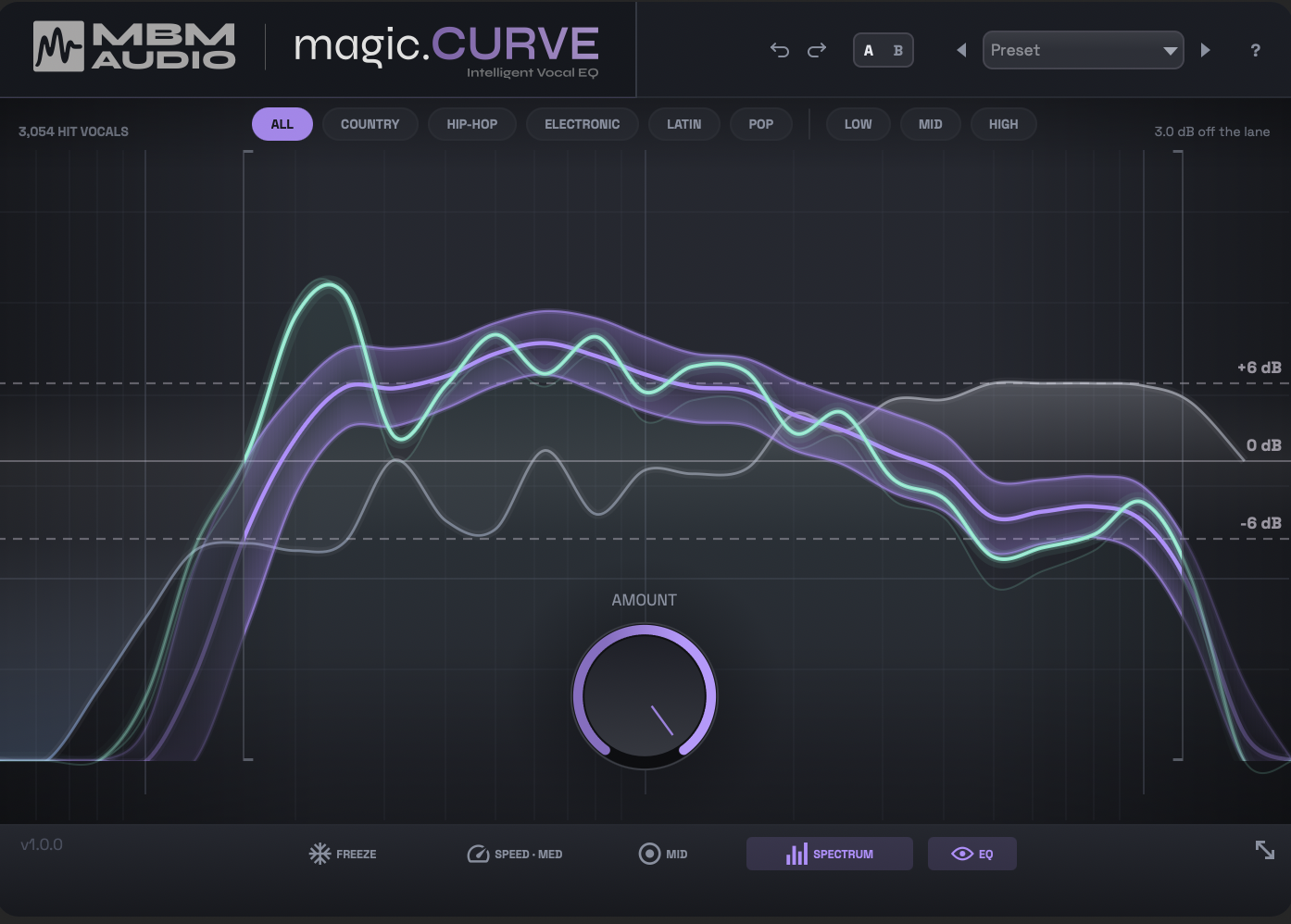
-
The mint line is your vocal, live
Play and watch your tone move toward the hit pocket in real time - no static curves to draw.
-
The purple band is the hit pocket
Where the 3,054 hit vocals sit for your chosen target: six genre lanes, three voice registers.
-
You can see the EQ
The actual correction it applies is drawn on the same display. Nothing hidden.
-
AMOUNT is the one knob
Pick a target, turn AMOUNT to taste. Zero-latency, drop-in easy - no EQ degree required.
How it works
Pick a target, turn AMOUNT. The display shows your vocal (the mint line) against the hit pocket (the purple band) so you can see exactly how close you are.
Drop it on your vocal
Zero-latency, so it goes straight onto your vocal chain in any DAW.
Pick a target
Choose a genre chip or your singer’s voice type. Leave it on All Hits if you’re not sure.
Turn AMOUNT
Raise AMOUNT (start around 50%) until your line settles into the band. A/B against bypass - you’re done.
The tonal balance of hit vocals in that style. All Hits is the broad average across everything.
Your singer’s register. Best on sung vocals. One target at a time - picking a voice type clears the genre, and vice-versa.
Producers are loving magic.CURVE
Real reviews from producers using magic.CURVE in their sessions.
"Rare that a developer actually comes up with something unique. This fits that description. There is no such thing as an absolute “one-button-fits-all” plugin because there are so many variables. But this gets a great starting point! Good job."
Anonymous
Verified Purchase
"It's okay, not worth that much money, vocals sound dull sometimes before the correction decides to do something even when set to fast, makes it sound quite muddy top ends really get lost even at the harsh preset. It's not quite ready yet."
Anonymous
Verified Purchase
Reply from Mattie
Thanks for the honest review, this is useful. Two things should help. Harsh / Bright only cuts (it tames 2-5 kHz), so it will take top end away by design. For a vocal that's going dull or muddy, try Dull / Dark Mic (boost-only, lifts presence and air) or Boomy / Muddy (clears low-mid build-up without touching the top).
"It Doesnt Show up in Fender Studio Pro."
Anonymous
Verified Purchase
Reply from Mattie
Sorry about that, and thanks for flagging it. If you're on a Mac, the very first build (1.0.0) was accidentally made to require macOS 26, so on older systems it wouldn't load in any DAW. That was fixed within a day, and 1.0.2 is in your account dashboard. If it still doesn't show up, go to Studio Pro > Options > Locations > VST Plug-Ins, click Reset Blocklist and restart so it rescans. Still stuck? Send me an email and I'll sort it out.
"solid stuff"
Bobert Stonert
System requirements
Make sure your setup is compatible before you buy.
macOS
- macOS 11 (Big Sur) or later
- Intel & Apple Silicon (Universal Binary)
- AU, VST3 & AAX
- Minimal CPU & RAM usage
Windows
- Windows 10 or later
- 64-bit (x86_64)
- VST3 & AAX (Pro Tools)
- Minimal CPU & RAM usage
Quick questions
The short answers. Install, targets, and workflows live in the docs.
Read the full docs →What does magic.CURVE do?
It automatically matches your vocal’s tonal balance toward the measured tonal balance of real hit vocals - an intelligent vocal EQ. It reads your vocal’s spectrum live and gently shapes it toward a target lane (a genre, or a voice type) built from the 3,054 Billboard hit vocals I measured.
How is it different from a normal EQ?
A normal EQ is you dialing bands by ear. magic.CURVE measures your vocal live and moves it toward a real, data-derived target on its own - one knob (AMOUNT) instead of a dozen. The display shows exactly where you are vs. where the hits sit.
What do I need to run it?
Any DAW that takes VST3, AU, or AAX plugins, on macOS or Windows - including Pro Tools. It’s zero-latency, so it drops straight onto your vocal chain.
Genre vs. voice type - which do I pick?
Genre targets the tonal style of that kind of song. Voice type (Low / Mid / High) targets your singer’s register and works best on sung vocals. You pick one at a time; layer by switching between them.
Is it a one-time purchase?
Yes - $59 once, yours forever, with lifetime updates. And there’s a 30-day money-back guarantee, so trying it is risk-free.
Get your vocal into the hit pocket
One knob, targets from the 3,054 hit vocals I measured. One-time purchase, lifetime updates.
Instant download. Lifetime updates.
Questions about the plugin?
Read the full docs