 MBM Audio Plugin
magic.ride
Precision Vocal Leveling
Automatically rides the gain of vocal recordings to maintain consistent levels — like a skilled engineer riding a fader.
magic.RIDE v1.3.1 — What's New
Current release
✦ New Features
- Linux support — Native VST3 and LV2 builds, tested on Bitwig, Reaper, Ardour, Tracktion, and Carla.
- Natural Mode now defaults ON — The phrase-aware behavior that defines magic.RIDE is on out of the box.
- Independent Boost / Cut range knobs — Set different ceilings for "make it louder" vs. "tame it." Drag the locked knob for symmetric range, or click the lock to set boost and cut independently.
- New "Rescue" preset category — 6 problem-solving starters: Quiet Vocal Recovery, Tame Loud Vocal, Erratic Performer, Mumble / Low Energy, Pitchy / Wobbly, Save the Take.
- 17 new presets total — 7 genre-specific lead presets (Modern Pop, Country, R&B, Indie, Rock, EDM Hook, Trap), 2 background, 2 speaking, plus the Rescue category.
✓ Bug Fixes & Stability
- Sidechain routing now works in Logic Pro — Bus declaration fixed and AU declared sandbox-safe.
- Cross-DAW correctness — Lock-free FIFO between audio and UI threads, block-size-compensated parameter smoothing, NaN/Inf output scrubbing, and automation gesture cleanup across bypass.
- Cross-version installer cleanup — Upgrades from 1.x or the legacy "Vocal Rider" name happen automatically with no manual file deletion.
⬡ Distribution & Compatibility
- macOS — AU, VST3, and AAX. Universal Binary, signed and Apple-notarized PKG installer.
- Windows — VST3 and AAX (Pro Tools).
- Linux — VST3 and LV2.
Quick Start
- 1
Insert on your vocal track
Add magic.ride as an insert effect on your vocal channel, early in the chain (before compression).
- 2
Click AUTO-TARGET
Play a representative section (verse + chorus) and click AUTO-TARGET. The plugin analyzes your vocal for 3 seconds and sets optimal TARGET, RANGE, and SPEED.
- 3
Fine-tune and let it ride
Adjust TARGET ±2-3 dB if needed. Set SPEED based on tempo (faster for rap, slower for ballads). Watch the gain curve in the waveform — you're done!
Main Controls
TARGET
Sets the target level where you want your vocal to sit consistently. Uses RMS/LUFS detection to measure average vocal level and adjusts gain to maintain this target. Extended range down to -50 dB supports quieter recordings.
RECOMMENDED SETTINGS
Use the AUTO-TARGET button to analyze your vocal and automatically set this. Lower values = quieter vocal, higher values = more prominent.
RANGE (Dual Boost / Cut)
Sets the maximum gain adjustment. A single dual-range knob with separate Boost (top) and Cut (bottom) values. By default they're locked together for a symmetric range — drag to adjust both at once. Click the lock icon to unlock and set independent ceilings (e.g. boost 10 dB but only cut 4 dB to maintain consistency without aggressive ducking).
RECOMMENDED SETTINGS
Locked is right for most vocals; unlock when you have an asymmetric problem. Maxing both directions (>10 dB) can sound unnatural or 'pumpy'. Range lines are visible in the waveform display (dashed gray).
SPEED
Controls how quickly the plugin responds to level changes. Automatically adjusts attack and release times.
RECOMMENDED SETTINGS
Faster speeds catch quick level changes but can sound more 'worked'. Use NATURAL mode with fast speeds to maintain musical feel.
GAIN Meter
Shows real-time gain changes being applied. Center = 0 dB, cyan = boost, purple = cut.
If constantly at max/min, increase RANGE or adjust TARGET. Minimal movement means the vocal is already well-balanced.
Feature Toggles
NATURAL
Preserves the natural dynamics and expression of the performance by reducing gain adjustment during intentional dynamics (crescendos, emphasized words). On by default since v1.3.1 — it's the phrase-aware behavior that defines magic.RIDE.
Leave ON for expressive, dynamic singing. Turn OFF for consistent speech, podcast, or when you want maximum leveling.
SMART SILENCE
Automatically reduces gain during silence or very quiet passages to prevent amplifying noise floor.
Turn ON for recordings with breath noise or room ambience. Turn OFF for clean studio recordings.
AUTO-TARGET
Click to activate 3-second learning mode. Analyzes your vocal and automatically sets TARGET, RANGE, and SPEED based on the audio.
Use at the start of your session. Play a representative section including both quiet and loud moments.
NOISE FLOOR
Adaptive noise floor detection. When enabled, the plugin ignores audio below the noise floor threshold, preventing it from boosting room noise, bleed from other instruments, or low-level artifacts. Adjust the threshold knob to set where 'silence' begins.
Turn ON for recordings with audible room noise, headphone bleed, or when tracking alongside other instruments. Adjust threshold until the noise floor is excluded but quiet vocal passages are still captured.
Advanced Panel
Click the gear icon in the plugin to access these controls.
LOOK-AHEAD
OffEnables the plugin to 'see ahead' in time for smoother gain changes. Higher values = smoother automation curve.
Options: Off, 5ms, 10ms, 20ms
DETECTION
RMSRMS for music production. LUFS for broadcast/podcast (EBU R128 standard).
Options: RMS, LUFS
ATTACK
Auto (SPEED)How quickly gain increases when the vocal gets quieter. Auto-set by SPEED knob.
Range: 1ms to 500ms
RELEASE
Auto (SPEED)How quickly gain decreases when the vocal gets louder. Slower release prevents pumping.
Range: 10ms to 2000ms
HOLD
0msMaintains current gain level before releasing. Prevents rapid gain changes during brief pauses.
Range: 0ms to 200ms
BREATH
2 dB (gentle)Reduces breath sounds and quiet passages. Light (3-6 dB), Medium (6-9 dB), Heavy (9-12 dB).
Range: 0 dB to 12 dB
TRANSIENT
50%Preserves transient peaks (consonants like 't', 'k', 's') during gain reduction. Great for rap vocals.
Range: 0% to 100%
OUTPUT
0 dBOutput trim applied after all processing. Adjust to match bypassed level or add makeup gain.
Range: -12 dB to +12 dB
Workflow Examples
Quick Start
- 1 Load magic.ride on your vocal track
- 2 Play a representative section (verse + chorus)
- 3 Click AUTO-TARGET and let it analyze for 3 seconds
- 4 Fine-tune TARGET if needed (±2-3 dB)
- 5 Adjust SPEED based on song tempo and vocal style
- 6 Monitor the gain curve in the waveform display
Podcast/Voiceover
- 1 Load 'Broadcast Voice' preset
- 2 Turn ON SMART SILENCE
- 3 Set BREATH to 6-9 dB in Advanced panel
- 4 Set DETECTION to LUFS
- 5 Adjust TARGET to -16 dB
- 6 Set SPEED to 60-80% for natural speech
Dynamic/Expressive Vocal
- 1 Start with 'Gentle Vocal' preset
- 2 Turn ON NATURAL to preserve dynamics
- 3 Increase RANGE to 15-18 dB
- 4 Set SPEED to medium (40-60%)
- 5 Set TRANSIENT to 30-50% for punch
- 6 Use A/B compare to check processed vs. natural
Understanding the Waveform Display
RMS Waveform Display
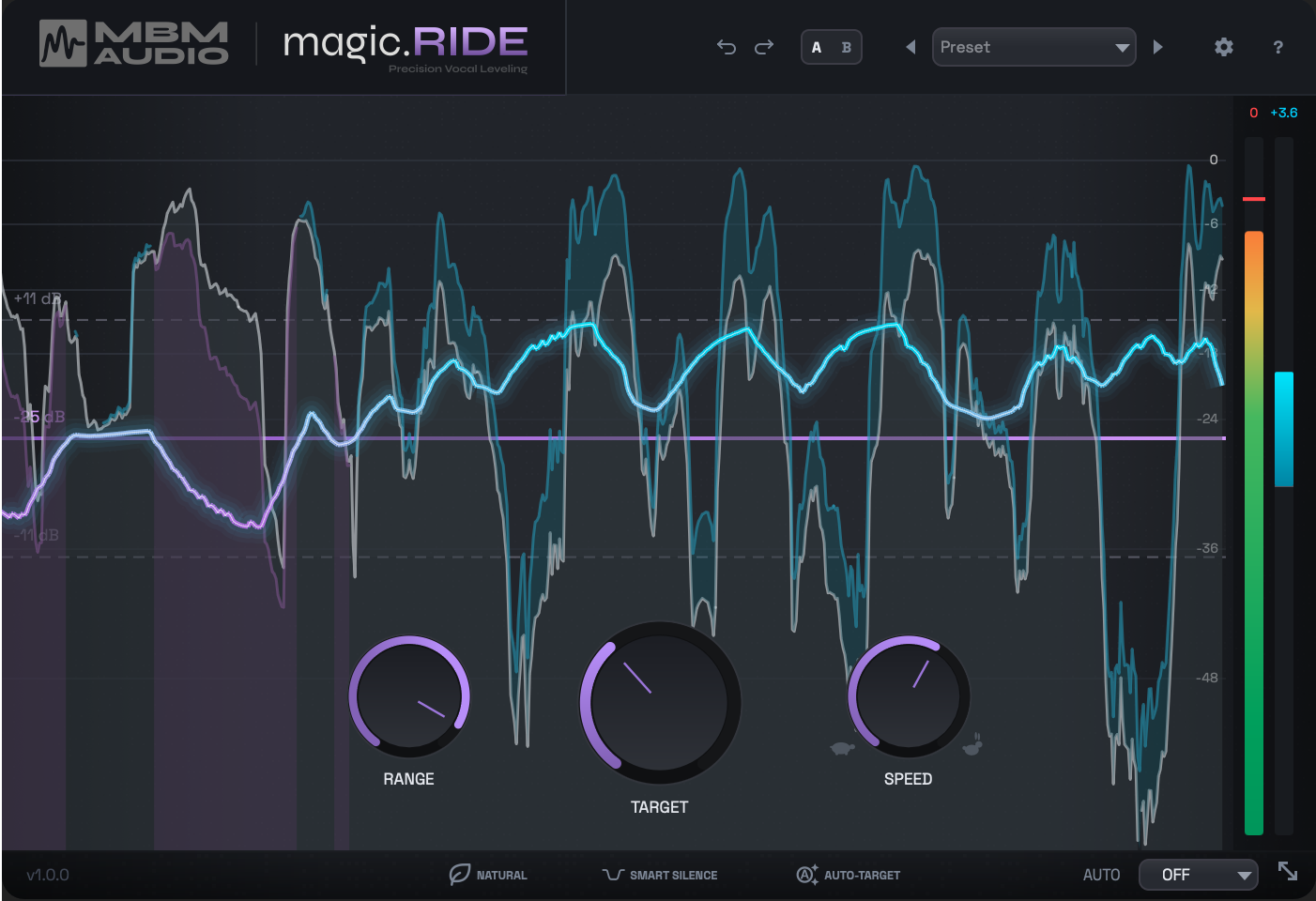
The scrolling waveform shows short-term RMS levels — matching what the gain rider actually reacts to — instead of raw peaks. The output meter also displays RMS. This gives you much more intuitive visual feedback of what the plugin is doing to your signal.
Adaptive Display Zoom
Toggle the zoom icon in the status bar to enable Adaptive Display Zoom. This automatically zooms the waveform to center around your target level, making gain riding activity much easier to see — especially on quieter vocals where the waveform would otherwise appear tiny.
Color Guide
White/Gray Waveform
Input signal RMS level (original audio before processing)
Purple Target Line
Your TARGET setting visualized. Click and drag to adjust in real-time.
Cyan/Blue Gain Curve
Gain boost — plugin is making the vocal louder
Purple Gain Curve
Gain cut — plugin is making the vocal quieter
Dashed Range Lines
Maximum boost/cut boundaries based on your RANGE setting. When unlocked, boost and cut lines may be asymmetric.
Pro tip: Flat gain curve = no adjustment needed. Smooth curves = natural processing. Jagged/extreme curves = consider adjusting SPEED or RANGE. Enable Adaptive Zoom on quieter vocals for a clearer view.
Tips for Best Results
Recording
- Record vocals averaging around -18 dB before processing
- Use good mic technique — consistent distance from mic
- Clean recordings give the best results
Mixing
- Place magic.ride early in your chain (before heavy compression)
- Use it for macro dynamics, follow with compressor for micro dynamics
- The two tools work together beautifully
Avoid Common Mistakes
- Don't over-range (>18 dB can sound unnatural)
- Don't set TARGET too high (risk clipping)
- Don't ignore the waveform — visual feedback is your friend
- Always check bypassed sound to ensure improvement
magic.RIDE Lite (Free)
magic.RIDE Lite is the free version of magic.RIDE, designed to give you the core vocal leveling experience at no cost. It includes the essential gain riding engine and is a great way to experience automatic vocal leveling before upgrading to the full version.
Included in Lite
- Real-time gain riding engine
- TARGET level control
- RANGE control (symmetric)
- SPEED control
- Scrolling RMS waveform display
- Gain meter
- AU, VST3 & AAX (macOS) · VST3 & AAX (Windows) · VST3 & LV2 (Linux)
Full Version Adds
- NATURAL mode (phrase-based leveling)
- SMART Silence detection
- AUTO-TARGET analysis
- Noise Floor detection
- Dual Range knob (lock/unlock)
- Adaptive Display Zoom
- Advanced controls (Attack, Release, Hold, Look-Ahead, Breath, Transient)
- DAW automation writing
FAQ
System Requirements
macOS
- macOS 14 (Sonoma) or later
- AU (Audio Unit), VST3, AAX
- Intel & Apple Silicon (Universal Binary)
Windows
- Windows 10 or later
- VST3, AAX (Pro Tools)
- 64-bit (x86_64)
Linux
- Modern x86_64 distros
- VST3, LV2
- Tested on Bitwig, Reaper, Ardour, Tracktion, Carla
Compatible DAWs
Need Help?
Having trouble with magic.ride? Reach out and I'll help you get it sorted.
Contact Support